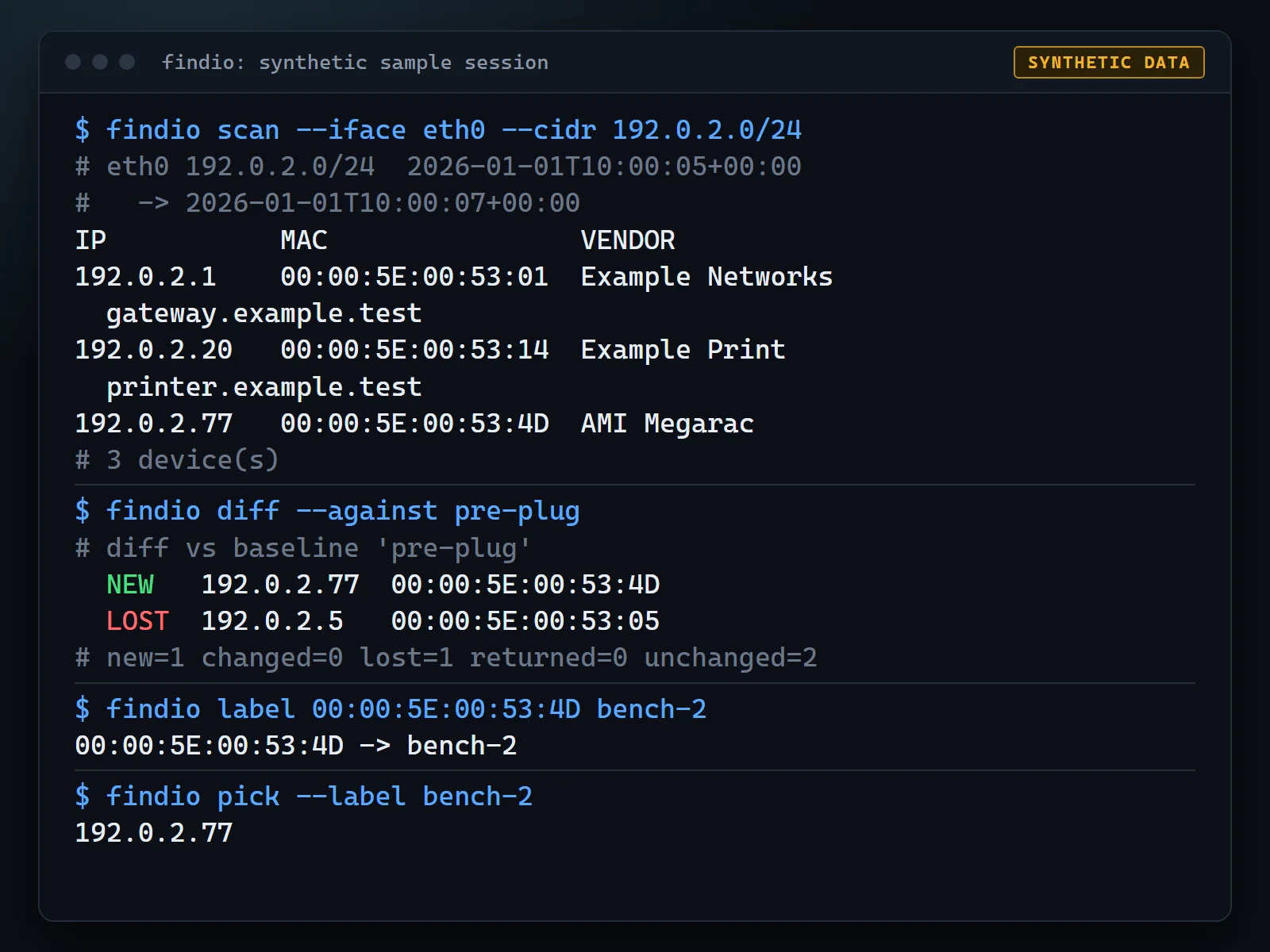
Anyone who has racked a test system on a crowded lab network knows the moment: the machine is powered, the cable is in, and nobody knows what address it took. FindIO answers that with a snapshot and a diff. Scan the network before you plug the system in, plug it in, scan again, and whatever is new is your machine, or its management controller (BMC).
It is a supporting lab utility, not a measurement tool. It exists to save a few minutes of guessing at the start of a test session, and it sits in the small bench helpers on the software page.
Why it exists
DHCP addresses change, and a BMC sits on its own address, often on a separate network from the host it manages. Reading a router’s lease table or running a general scanner works, but it does not tell you which entry is the one you just connected. A before-and-after diff does. Labels are stored against the MAC address, so a name such as bench-2 survives DHCP renewals and you can ask for the machine by name later.
What it does
findio scansends an ICMP sweep, reads the ARP cache, then resolves names and vendors. It prints a table, or JSON with--json.findio baseline save NAMEstores a named snapshot, andfindio diff --against NAMEreports what is NEW, CHANGED (same MAC, new IP) or LOST.findio scan --watchrescans on an interval and prints only the changes.findio label MAC LABELattaches a sticky label to a MAC address, andfindio pick --label NAMElooks it up in a script-friendly way.findio pickopens a Textual picker that returns the chosen device asuser@ip. It does not launch SSH itself.- With two network interfaces, such as a production LAN and a separate BMC network,
findio scan --allsweeps every interface that is up.
Names are resolved in order: your label, reverse DNS, an SSH banner fingerprint that recognizes common BMC firmware, then the vendor from the MAC address. The bundled vendor table is a small hand-curated subset of about 130 prefixes from the public IEEE registry. You can drop in the full registry file to override it.
Honest limitations
- It only sees hosts on networks your machine is directly attached to. With no layer-3 access, there is no visibility.
- It cannot catch a BMC that is mid-reset while the scan runs, and it cannot tell two identical BMCs apart without labels.
- It covers IPv4 only and is not a replacement for nmap.
- Live scanning works on Linux and macOS. On Windows it reports “no scannable interfaces”, although the test suite runs there.
- The registry at
~/.findio/state.dbstores IPs, MACs, hostnames, SSH banners and your labels. Keep it out of shared folders and bug reports.
Get started
Python 3.10 or newer, with the core tool using only the standard library:
pip install .            # CLI and library
pip install ".[tui]"     # adds Textual and Rich for findio pick
findio scan                          # before you plug the system in
findio baseline save pre-plug
# ... plug the system in ...
findio scan
findio diff --against pre-plug
Safety notes
FindIO is an active scanner. It sends an ICMP echo to every host in the subnet, reads the ARP cache and, by default, opens TCP port 22 on each host it finds to read the SSH banner. Use it only on networks you own or are explicitly authorized to test.
The built-in guard rails help, but they do not replace that judgement:
- It scans only the subnet bound to one of your own interfaces unless you pass
--cidr. - It refuses publicly routable ranges unless you pass
--allow-public. - It refuses sweeps larger than 1024 hosts.
- Ping starts are rate limited to 200 per second by default, with at most 64 workers.
- The SSH banner probe reads one greeting line and sends nothing.
--no-ssh-probeturns it off, and--no-resolveskips all probing beyond ping.
Open source under the MIT License
FindIO is open source under the MIT License, with the code, architecture notes and synthetic sample output on GitHub.